
Language integrated queries are a very simple but powerful way to manage custom collections. Whilst this is only one use for LINQ (it can be used for database connection and all manner of other data driven queries), it is probably the way I use it most frequently.
To demonstrate, I have simply created a custom ‘Person’object:
public class Person
    {
        public string Forename { get; private set; }
        public string Surname { get; private set; }
        public int Age { get; private set; }
        public Gender Gender { get; private set; }
        public Person(string forename, string surname, int age, Gender gender)
        {
            this.Forename = forename;
            this.Surname = surname;
            this.Age = age;
            this.Gender = gender;
        }
    }
Then I have created 3 LINQ queries we can apply to a collection of Person objects, one to return only the children:
static IEnumerable GetChildren(IEnumerable personList)
        {
            IEnumerable children =
                from Person in personList
                where Person.Age < 18
                select Person;
            return children;
        }
one to return only the women:
static IEnumerable GetWomen(IEnumerable personList)
        {
            IEnumerable women =
                from Person in personList
                where Person.Gender == Gender.Female
                select Person;
            return women;
        }
and one to return all members sorted alphabetically by surname:
static IEnumerable OrderAlphabetically(IEnumerable personList)
        {
            IEnumerable ordered =
                from Person in personList
                orderby Person.Surname
                select Person;
            return ordered;
        }
You will notice that when we use LINQ here, we’re actually passing and returning collections that implement the IEnumerable interface, of which List is one. LINQ does not return a List by default, so should we need to return a list we can always cast back using .ToList();
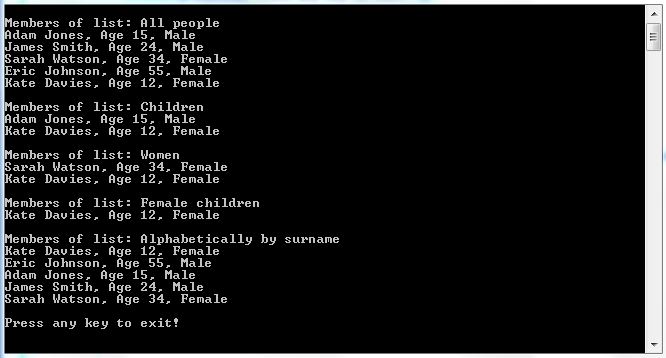
To demonstrate the use I have created a quick console application. You may notice that it is also possible to chain queries to apply multiple filters to a list:
class Program
    {
        static void Main(string\[\] args)
        {
            List people = new List();
            people.Add(new Person("Adam", "Jones", 15, Gender.Male));
            people.Add(new Person("James", "Smith", 24, Gender.Male));
            people.Add(new Person("Sarah", "Watson", 34, Gender.Female));
            people.Add(new Person("Eric", "Johnson", 55, Gender.Male));
            people.Add(new Person("Kate", "Davies", 12, Gender.Female));
            WriteListToConsole("All people", people);
            WriteListToConsole("Children", GetChildren(people));
            WriteListToConsole("Women", GetWomen(people));
            WriteListToConsole("Female children", GetWomen(GetChildren(people)));
            WriteListToConsole("Alphabetically by surname", OrderAlphabetically(people));
            Console.WriteLine();
            Console.WriteLine("Press any key to exit!");
            Console.ReadKey();
        }
        static void WriteListToConsole(string title, IEnumerable personList)
        {
            Console.WriteLine();
            Console.WriteLine("Members of list: " + title);
            foreach (Person p in personList)
            {
                Console.WriteLine(string.Format("{0} {1}, Age {2}, {3}", p.Forename, p.Surname, p.Age, p.Gender.ToString()));
            }
        }
   //LINQ queries go here, removed for brevity
  }
The post Query Custom Collections in C# with LINQ appeared first on Talking I.T. Through.
About the author
- Principal engineer. C#/.NET, AI tooling, and IoT. Always building.
Comments
Join the discussionNo comments yet. Be the first to comment.
Talking I.T. Through
A series of articles imported from my previous blog hosted at https://www.talkingitthrough.co.uk.


